
Template
Toy Car to Real Car AI Video Generator
Upload one photo and get a 30-second Toy Car to Real Car meme video, 9:16 vertical. The template's own audio is mixed into the video in your browser when you turn the soundtrack on. 1000 credits with Premium 480p.
This template needs a larger credit pack: its cheapest video is 1000 credits, and the starter pack does not cover it.
Use everyday photos of yourself or friends who agreed to appear. Photos of public figures, and film or music video stills, won't pass review.
This template needs a larger credit pack: its cheapest video is 1000 credits, and the starter pack does not cover it.
By uploading, you confirm this is your photo or you have permission to use it. Photos of celebrities, public figures, and politicians are not supported.
Preview the Toy Car to Real Car template
This slot keeps its size while the template's own preview is prepared.
Background
About the Toy Car to Real Car template
The Toy Car to Real Car template turns one photo into a 30-second 9:16 video of a miniature car that becomes the full-size car on a night road. Pricing is displayed before generation, and the default version starts at 1000 credits.[7]
What the Toy Car to Real Car trend is
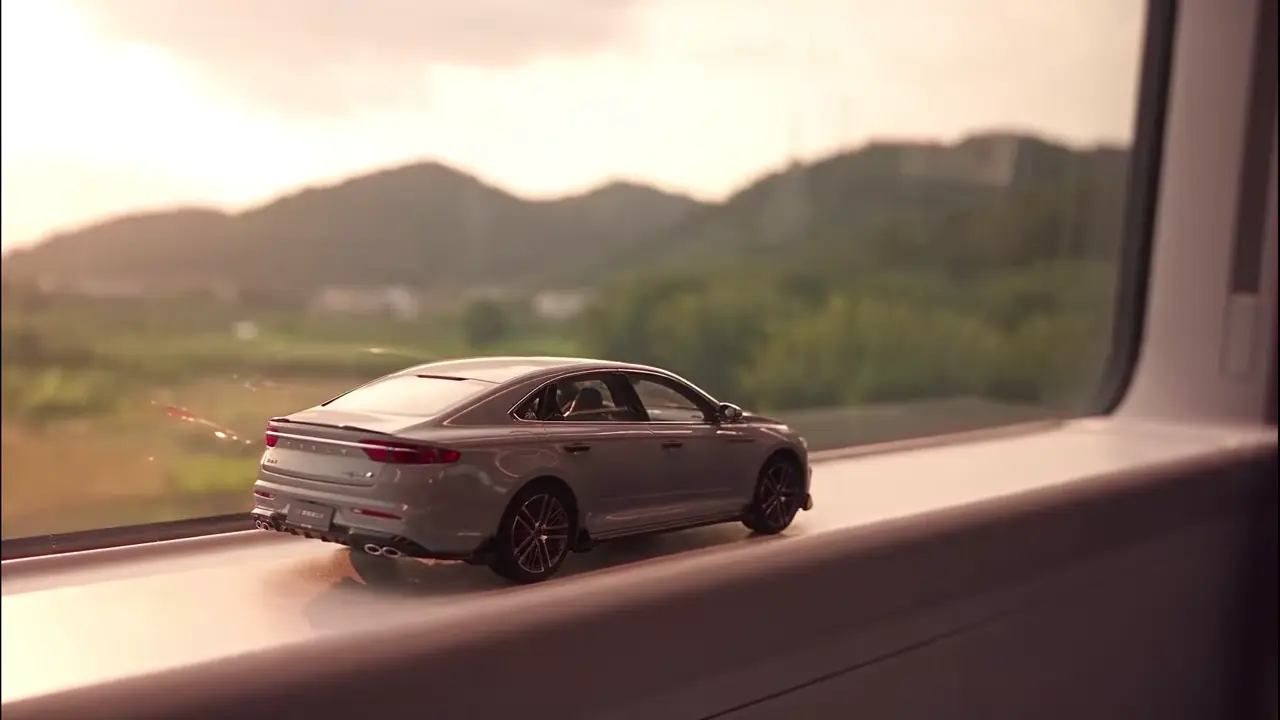
The supplied Instagram clip starts with a miniature car on a moving train's window ledge, with warm hills and vegetation outside. The surroundings darken and the tail lights come on. The window ledge transitions into a road, followed by night-road tracking shots of the full-size car. The selected first 30 seconds end near the front wheel and side of the car.[1]
The effect is a scale change rather than a real transformation, so the same car has to stay recognizable on both sides of the transition. This template renders it from one uploaded photo of the vehicle, following a silent grayscale depth reference that carries the camera move and the cut points.[7]
Where the train-window clip comes from
This template uses the first 30 seconds of the supplied Instagram post DejW-9FJOuu as its source reference. The preview is original source footage, not an ahhh.ai render. This page does not identify the original creator or claim who first made the effect.[1]
The train-window example
A miniature car on the train window ledge passes warm scenery and darker surroundings, its tail lights light up, and the ledge transitions to a night road. The first 30 seconds finish with tracking shots near the front wheel and side of the full-size car.[1]
29 October 2026
The supplied Instagram source replaced the earlier source. The template uses a 30-second excerpt, a matching silent grayscale depth reference and a prompt describing that excerpt. The original clip is not sent to the video model.[7]
The three beats of the train-window clip
The miniature on the ledge
The opening frames keep a toy scale: the car sits on the ledge and dusk scenery passes outside the window.[1]
The tunnel handoff
The light drops, the car's tail lights come on, and the camera moves forward while the ledge becomes the road surface.[1]
The full-size reveal
The full-size car continues along a night road with guardrails and street lights. Side-rear and front-side tracking shots lead to a front-wheel and car-side close-up at the end of the 30-second excerpt.[1]
What this template keeps and what it changes
Kept
The template retains the miniature, tunnel and full-size reveal structure of the linked example.[1], [7]
The template retains a 30-second 9:16 frame and the template soundtrack. The privacy policy states that if you include audio, your browser mixes the soundtrack into playback and download, without saving the mixed file on company servers.[7], [6]
Changed
The linked example shows one specific car with its own paint, badge and plate. In this template the uploaded photo supplies the vehicle's shape and colour, and the prompt excludes badges, readable plates and the original background.[1], [7]
The template does not send the original clip to the video model. Only a silent grayscale depth reference derived from it supplies motion, framing and cut points.[7], [6]
The privacy policy states that videos are generated through APIMart or Kie, and that APIMart reviews uploaded photos.[6]
How to make a Toy Car to Real Car video
Use the form on this page to add one photo into the slot labeled Your car. The photo should show one vehicle, fully in view, including all four wheels. Supported formats include JPG, PNG, and WebP under 20 MB.[7]
Review price and generate
Choose a quality, review the displayed cost, then generate. The default 30-second 9:16 video starts at 1000 credits. The privacy policy states that videos are generated through APIMart or Kie.[7], [6]
Download the MP4
The privacy policy confirms you can download and share the completed video. If you include audio, your browser mixes the template soundtrack into playback and download.[6]
Photo tips
Keep the entire car inside the frame with all four wheels visible: the prompt follows the wheels and the roofline across the scale change.[7]
Remove readable plates and avoid bystanders. The prompt excludes badges, plates and readable text, so a plate in a photo cannot be kept by accident.[7]
Prefer even daylight to strong reflections that hide the body shape.[7]
How to post a Toy Car to Real Car video
The template creates a 9:16 MP4 of about 30 seconds with music, formatted for TikTok, Reels, or Shorts. The privacy policy states that you can download and share the file, and that the video's media link stops working after a limited time.[7], [6]
Label a realistic generated clip as AI-generated on TikTok. Keep a local copy of anything you want to retain, and do not present the clip as a real car commercial or a real event.[5]
A source link credits an inspiration; it does not grant rights to its music or branding. Use audio licensed for the place and purpose of your post.[4]
Uploaded photos and finished videos stay available in your history for 30 days from when the video is generated successfully. Download what you want to keep.[6]
Sources and product policies
- [1] Supplied Instagram source: DejW-9FJOuu
- [2] Earlier train-window example cited by the unchanged FAQ
- [3] Current ahhh.ai templates
- [4] ahhh.ai acceptable use
- [5] TikTok: AI-generated content labels
- [6] ahhh.ai photo and output policy
- [7] Toy Car to Real Car template page
Page notes
Page copy rewritten in the Bad Times and ramalama bang-bang style, and the page now opens with the upload form, the price and the payment entry. The FAQ answers are unchanged.[7]
The template now uses the first 30 seconds of the supplied Instagram post DejW-9FJOuu. The original reference plays inside the same vertical preview frame as the other vertical templates, with black bars preserving the full image. The prompt and silent depth reference cover the same excerpt. The template is live: availability, pricing and soundtrack answers now describe the checkout and generation flow instead of the earlier review state.[1], [7]
Templates you can use now
See all templates →
Toy Car to Real Car AI trend: 10 questions, answered
A miniature vehicle becomes its full-size counterpart through a visual transition. The train-window variant starts on a window ledge, moves into a dark tunnel, and reveals the car on a road. It is an edited or generated illusion, not a real transformation.[2]
Use the form on this page to add one photo of the car, review the displayed price, then generate. The default 30-second 9:16 video starts at 1000 credits, and the finished MP4 downloads from your history.[3]
Neither is needed for the photo-based template: the scene supplies the miniature, train and tunnel. A practical filmed transition is a different workflow and would need its own props and editing.[2]
Prepare one sharp photo with the entire vehicle visible, including all wheels. A rear three-quarter view suits the tunnel reveal. Avoid overlapping cars, strong glare and people blocking the body; remove readable plates before uploading.[4]
This template is designed around a car silhouette and four wheels. Motorbikes, pets and people have not been tested for it. A similar prompt elsewhere is not evidence that this template supports them.[3]
These are useful checks before sharing: compare roofline, paint and wheel placement across the transition, then check which end of the car leads. A photo with an ambiguous viewing angle can make continuity harder. Results vary with the uploaded photo, so inspect the transition before sharing.[3]
The template costs 1000 credits for a 30-second Premium 480p video. The exact price is shown before you generate. There is no free trial; failed generations are refunded in credits.[3]
Last updated