
Template
58th Floor AI Trend: Two Photos, One Mic, Your Duet
Step into the 58th Floor AI Trend with two photos. Pick Mic Duet or Mic Wave and get a 9:16 MP4 from the 58th Floor AI video Generator.
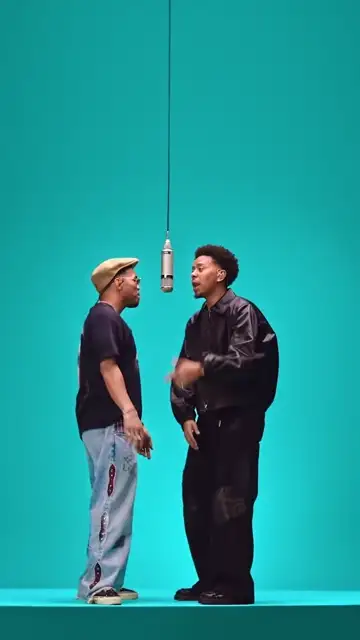
The example plays with the option's matching soundtrack.
Use everyday photos of yourself or friends who agreed to appear. Photos of public figures, and film or music video stills, won't pass review.
By uploading, you confirm this is your photo or you have permission to use it. Photos of celebrities, public figures, and politicians are not supported.
Background
About the 58th Floor AI Trend template
Two photos, one hanging studio mic, and about fifteen seconds of shared spotlight. This 58th Floor AI video Generator puts you and a friend into the 58th Floor AI Trend: pick Mic Duet (about 15 seconds) or Mic Wave (about 14.9 seconds), add a photo for each side of the mic, and get a 9:16 MP4. The left photo becomes the person who leans in toward the mic mid-clip; the right photo becomes the person who moves with them and looks toward the camera at the end.[3]
What the 58th Floor trend is
The 58th Floor trend comes from two-person performance clips filmed in a teal COLORS studio: two people share a raised platform, a silver studio mic hangs between them, and the camera keeps finding them at the mic. The appeal is the chemistry. Two people, one mic, and a moment that feels like an inside joke you get to watch.[1], [2]
Each video on this page has two roles. Left photo: the person left of the hanging mic, who moves closer to it in the middle of the clip. Right photo: the person right of the mic, who moves along with them and turns toward the camera for the finish. Faces, hair and outfits all come from the photos you add.[3]
From COLORS clips to your 58th Floor video
It starts with two original clips from COLORS, posted by @colorsxstudios on TikTok. Their two-people-one-mic staging became known as the 58th Floor trend. For this template, each clip was turned into a grayscale depth map at 720x1280 and 30fps. That depth map carries the motion, the staging and the camera timing. The AI generator follows the depth map of the option you pick and builds the two people from your photos.[1], [2], [3]
Each option plays with its matching soundtrack, mixed in by your browser for playback and download when you include audio.[3]
The originals
@colorsxstudios posts the two studio clips on TikTok that this page offers as Mic Duet and Mic Wave.[1], [2]
The trend
The two-people-one-mic format spreads as the 58th Floor trend.[1], [2]
The template
Each original becomes a 720x1280, 30fps grayscale depth reference, and both are offered as options on /templates/58th-floor.[3]
Mic Duet or Mic Wave: pick your moment
Mic Duet (Option A, about 15 seconds)
The playful one. A quick step and a handclap in the wide shots, chest-up close-ups at the mic, and an easy grin to close. Both options are 9:16 MP4s, both use two photos, and both keep the same left and right roles.[1]
Mic Wave (Option B, about 14.9 seconds)
The smooth one. The pair flows through the same hand-wave routine in sync, arms swaying across the body, while the camera glides from full body to waist height to a tight close-up at the mic. Both options are 9:16 MP4s, both use two photos, and both keep the same left and right roles.[2]
What the template keeps and what comes from you
Kept
The motion, staging and camera timing of the option you pick, carried by its depth map.[3]
The studio stage with the silver mic hanging between the two people.[3]
The length and frame: about 15 seconds (Mic Duet) or about 14.9 seconds (Mic Wave), 9:16.[3]
The option's matching soundtrack, mixed in by your browser for playback and download when you include audio.[3]
Changed
The two people: faces, hair and outfits come from your photos.[3]
Who stands where: the left photo leans in toward the mic mid-clip, the right photo moves along and looks toward the camera at the end.[3]
The option: Mic Duet or Mic Wave.[3]
How to make your 58th Floor AI video
One for the left of the mic, one for the right.[3]
Choose Mic Duet or Mic Wave
The player switches to that COLORS original so you can see the moves first.[3]
Check the price and generate
The current price is shown before you generate. See pricing for packs.[3]
Download the MP4
Save it from this page or from your generation history.[3]
Photo tips
Pick one person per photo, facing the camera, with the face and upper body in clear view.[3]
Even light and a plain background help the people come through cleanly.[3]
Wear what you want on stage: the outfit in the photo is the outfit in the video.[3]
Use photos of people who agreed to be in the video.[3]
Posting your 58th Floor clip
Your video arrives as a 9:16 MP4, ready for TikTok, Instagram Reels or YouTube Shorts. Download it, open the app, and upload it as a new post. Include audio before you download if you want the option's matching soundtrack in the file. Videos with the soundtrack are for personal social-media posting only. For commercial use, turn the soundtrack off. Add #58thFloor so people find the trend, and use the platform's AI-generated label where it asks. Your photos and videos are handled as described in the Privacy Policy.[3]
The privacy policy states that you can download and share the file, and that the video's media link stops working after a limited time.
Photos and finished videos remain available for 30 days from when the video is generated successfully.[4]
Sources
- [1] Mic Duet original by @colorsxstudios on TikTok
- [2] Mic Wave original by @colorsxstudios on TikTok
- [3] 58th Floor template page
- [4] Privacy Policy
- [5] Refund Policy
- [6] Acceptable use
Updates
15 seconds
58th Floor is live with Mic Duet and Mic Wave, each with its matching soundtrack.[3]
Related templates
See all templates →- Bad Times
 9:16 · 15s
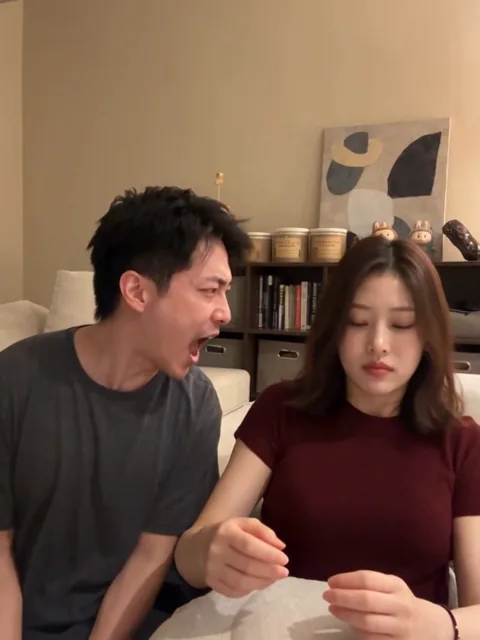
Bad Times
Two people face each other in a short argument.
2 photos · from 450 credits
Bad Times is another live template.
58th Floor AI Trend: your questions
It's a duet moment in a teal studio: two people on one stage, a silver mic hanging between them, and a camera that keeps pulling them toward it. The clips come from COLORS on TikTok (@colorsxstudios), and the format now carries the 58th Floor name. Here, you can step into it with your own pair of photos.[1], [2]
Mic Duet runs about 15 seconds: a quick step, a handclap, close-ups at the mic and a grin to finish. Mic Wave runs about 14.9 seconds: a synced hand-wave routine while the camera glides in from full body to a tight close-up. Both are 9:16, both take two photos, and both sit on this one page.[3]
Upload two photos, one for each side of the mic. Choose Mic Duet or Mic Wave. Check the price shown, hit generate, then download the MP4 from this page or your generation history.[3]
Go for one person per photo, facing the camera, face and upper body clearly visible, in even light against a plain background. The pose matters less than clarity, since the movement comes from the template. Put the person who leans in toward the mic on the left, and the person who ends looking at the camera on the right.[3]
Mic Duet is about 15 seconds and Mic Wave about 14.9 seconds, both as a 9:16 MP4. The resolution options and the price appear in the generator before you generate. For reference, the depth map that guides the motion is 720x1280 at 30fps.[3]
The original clip shapes the moves and your photos shape the people. Each COLORS clip was turned into a grayscale depth map at 720x1280 and 30fps that holds the motion, staging and camera timing. The generator follows that map for your chosen option and draws faces, hair and outfits from your two photos.[3]
Each option comes with its own matching soundtrack, and your browser mixes it into playback and the download when you include audio. Videos with the soundtrack are for personal social-media posting only. For commercial use, turn the soundtrack off. Want a different sound for your post? Add it inside TikTok, Reels or Shorts when you upload.[3]
Download the MP4 from this page or from your generation history; the download is the full video file. Then open TikTok or Instagram, start a new post or Reel, and upload the file from your phone or computer. YouTube Shorts works the same way.[3]
Your photos and finished videos sit in your account's generation history, in private storage. How long they stay there and how to ask for deletion are set out in the Privacy Policy. Download any video you want to keep.
See pricing for the current packs. The current price is shown before you generate, so you know the cost before your video starts.[3]
Follow the status shown for your video in the generator and your history. Under the Refund Policy, failed videos are refunded in credits automatically. When you're ready, generate again at the price shown.
Last updated